Telephones only want a twisted pair. Ethernet, popular with businesses for decades, also wants a twisted pair. Now, that pair must meet much stricter criteria to be suitable, such as Category 5 (for 100Mbit) or Category 5e (1000Mbit ie Gigabit) - but it really is just twisted pair cable, merely a tighter specification than your phone.
Suppose you are a sparky (electrician) and you have some jobs where you are to install telephone connections, some where you put in "Ethernet" (presumably 100baseT would be fine) and some they specifically want you to wire for Gigabit.
You could go to your wholesaler and buy a reel of Cat3 phone cable, a reel of Cat5 100baseT Ethernet, and a third reel of Cat 5e Gigabit cable, and take the right one for each job. So long as you do this flawlessly you can probably save a few pounds every year by using a slightly cheaper cable for some jobs.
Or, you can buy one reel of Cat5e and use that for all these jobs and since it's the same reel you can't have the wrong one and don't need to check paperwork to know you've put the correct cable in a duct etc. Thought that was a phone line but now the client insists it's data? No problem, they're the exact same cable, just smile and agree.
When I bought the place where I live now I wanted GigE to this desk, even though the DSL comes into a different room. I didn't love the idea of cutting holes in walls but I was resigned to maybe needing that, except there's a phone extension in this room (like the author says, we do love phone extensions) and so that room the DSL comes into has a twisted pair to here. I opened up the box, and I'm like huh, that's Cat5e, and sure enough this entire building was wired with Cat5e because like I said, why not, it's basically the same cable, why carry a separate reel?
So I changed the face plates from telephone to Ethernet, and I'm done.
To my surprise they were all cat5 cables. With the house being built in 2003 this was surprisingly forward-looking.
I capped all the cables that were on the punchdown panel and put a switch in there instead, and replaced all the wall jacks with RJ45, and bam, working gigabit around the house, including PoE for my WiFi access points. Still haven’t had to punch any holes in the walls.
Condo built in 2006 with cat5 . Two bedrooms + living room all wired with rj11 phone jacks. Just snipped those off, wired up rj45, and attached the other ends in my utility closet to a patch panel with rj45 as well.
I don't know if it's just cat5 or 5e, but it saturates a 2.5Gbe link and in-wall cable length is about 15-25 meters.
So sadly you still have to punch holes.
Then again, it isn't that much of a bother if all you have to do is punch a lower hole, relocate the socket and then plaster both holes up and repaint. Especially if you make it a weekend job to do the whole house at once. Or rather, the way I look at it is that it's a weekend job that will improve how the house feels for decades. Doing blind wiring (gutters) for all the ceiling lights falls in the same category.
Instead, get a MoCA adapter like this one [1]. You can get 2.5Gbps over coax!
MoCA us interesting but that's a lot of equipment at each end compared to just a cable.
Cat 6 would be better though so I could run POE from the basement switch to power the wifi AP, and instead I need to go do a much more complicated switch (cat6) -> moca adapter + power brick to power moca adapter -> coax -> moca adapter + power brick (cat6) -> POE injector (with power brick) -> wifi AP. SO I'm adding at least three power bricks to the setup, which is annoying. Otherwise it would be one cat6 drawing POE from the switch and powering the AP.
MoCA devices have a 100 Ohm internal resistor at the end to limit the cable echoes, so they are not affected by the DC on the cable.
Unfortunately, all the RJ11 and alarm wiring runs to a closet in one half while all the coax and Cat5e run to a closet in the other half - with no RJ11 endpoints near the Cat5e/Coax closet and not Cat5e/Coax endpoints near the RJ11 closet (sigh). I tried Powerline data and it only works well in adjacent rooms and not at all between the halves due to separate electrical panels. Fortunately, there were a lot of coax runs set up for two separate nets (18-inch satellite and a huge attic antenna for OTA broadcast). So, by repurposing the now-unneeded antenna coax, MOCA 2.5 gbps mostly saved the day by filling in where the Cat5e should have gone but didn't.
I know more than a few who did this, ethernet cable pricing had just fallen at some point to make this more accessible.
This is why there are two wiring standards, T568A and T568B, with A being compatible with multi-line telephone systems:
> The T568A scheme is based on the older USOC (Universal Service Order Code) standard, which was used for telephone wiring before the advent of high-speed data networks. The USOC standard assigned the green pair to the first line and the orange pair to the second line of a two-line phone system.
* https://www.comms-express.com/infozone/article/t568a-and-t56...
> As of 2018, ANSI/TIA still [recommended] T568A for residential installations for plug-in backward compatibility with old technology like fax machines or a plug-in base station for wireless phone handsets. If you are not using any such devices, or have no intention of plugging ancient RJ11 plugs into RJ45 wall jacks like you would a “phone jack”, then it comes back to personal preference again.
* https://www.truecable.com/blogs/cable-academy/t568a-vs-t568b
* https://www.flukenetworks.com/knowledge-base/application-or-...
As long as both ends of the cable are the same, it does not practically matter which variant is used.
* https://en.wikipedia.org/wiki/ANSI/TIA-568#Wiring
There are also A-B crossover cables (though a lot of NICs can do auto-crossover nowadays):
I can’t recall if I put them back when I moved out. I must have, but I’ve no recollection of doing so. I think I left the junction box in the closet though.
Real cat5 and ethernet connectors just work and phone cable and phone plugs just work, but if you mix them you'll get all manner of expensive labor costs trying to figure out jury rigged solutions.
At one client they used two pair for business phone system, we're on a cable pulling team and one guy punches down the blue and green pairs the other side punches down blue and orange pairs (essentially a 568A vs 568B violation) and we spend SOME EXPENSIVE TIME trying to figure out why the cable toner "proves" we are on the same cable so it can't be a wiring fault.
Or the stereotype of the halfway colorblind guy at the far end working in the ceiling, on a ladder, in the dark, swaps the orange and brown pairs as happens sometimes.
Oh even funnier is there's always "that guy" who is too lazy to pull an additional cable to a new phone, so he steals some pairs from a nearby phone, somehow knocking out both phones in the process. Such a headache.
Labor for troubleshooting miswired cables/jacks is SO expensive its just cheaper at work to install phone lines using phone line parts and ethernet using ethernet parts.
The arrival of VOIP phones around Y2K, somewhat after my time, must make life so much easier. And now nobody uses wired phones everyone has a smartphone.
At home if you're doing one line and its a hobby so your time is free, then your strategy does work.
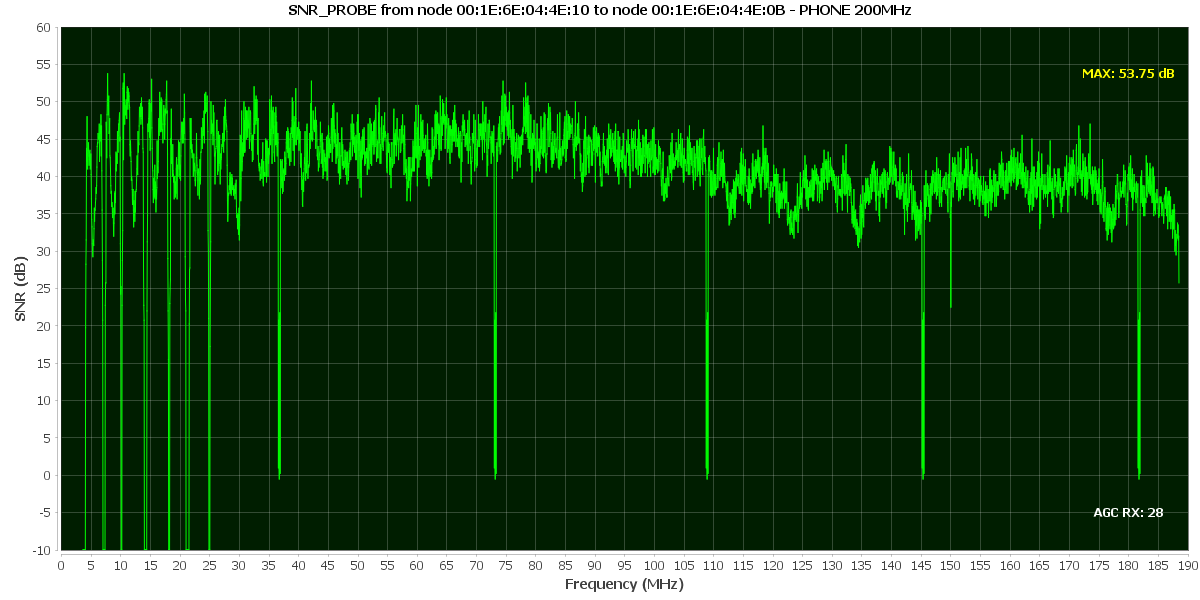
If the author is hitting 940 Mbps on a daisy-chain, either the echo cancellation or the frequency diversity on these chips must be lightyears ahead of standard DSLAMs. Does the web interface expose the SNR-per-tone graph? I suspect you would see massive dips where the wiring splits to the other rooms, but the OFDM is just aggressively modulating around them.
I don't think there is anything too fancy compared to a DSLAM. It's just that DSLAM are low-frequency long-range by design.
Numbers for nerds, on top of my head:
* ADSL1 is 1Mhz 8Mbps (2 kilometer)
* ADSL2 is 2Mhz 20Mbps (1 kilometer)
* VSDL1 is 15Mhz 150Mbps (less than 1 kilometer)
* Gigabit Ethernet is 100Mhz over four pairs (100 meters). It either works or it doesn't.
* The G.hn device here is up to 200 MHz. It automatically detects what can be done on the medium.
There are four pair of wires in the cable. If you use all of them for TX, you can't receive.
No, you absolutely can use them all for transmit and receive at the same time. The device at each end knows what signal it is transmitting, and can remove that from the received signal to identify what has been transmitted by the other end.
This is the magic that made 1000Base-T win out among the candidates for Gige over copper, since it required the lowest signaling frequencies and thus would run better over existing cables.
you may be thinking of 1000Base-TX (TIA‐854) which uses 2 pairs in each direction, similar to 100Base-TX (IEEE 802.3u). whereas 1000Base-T (IEEE 802.3ab) uses all 4 pairs in both directions.
basically, the -TX are dual simplex with a set of wires for each direction and -T are full-duplex with the same wires used in both directions at the same time.
  Autonegotiation is a requirement for 1000BASE-T implementations as minimally the clock source for the link has to be negotiated, as one endpoint must be master and the other endpoint must be slave.

  1000BASE-T uses four cable pairs for simultaneous transmission in both directions through the use of echo cancellation with adaptive equalization. Line coding is five-level pulse-amplitude modulation (PAM-5).

  Since autonegotiation takes place on only two pairs, if two 1000BASE-T interfaces are connected through a cable with only two pairs, the interfaces will complete negotiation and choose gigabit as the best common operating mode, but the link will never come up because all four pairs are required for data communications.

  Each 1000BASE-T network segment is recommended to be a maximum length of 100 meters and must use Category 5 cable or better.

  Automatic MDI/MDI-X configuration is specified as an optional feature in the standard that is commonly implemented. This feature makes it safe to incorrectly mix straight-through and crossover-cables, plus mix MDI and MDI-X devices.
I also recall that the chipsets don't do toning automatically, and so it's up the the management device to decide when to re-probe the channel and reconfigure the bins.
That being said, with 200MHz of spectrum to play with, the impact on rates should be negligible. With the 200MHz G.hn phone line profile (48KHz tone spacing), we get about ~1.5Gbps, so you can take some lumps and still get ~1Gbps throughput.
One big advantage though, G.hn is natively p2mp and each jack could have it's own G.hn endpoint.
> It’s the normal procedure to buy things from Europe since Brexit 2020. It’s actually quite shocking that Royal Mail still hasn’t updated their tracking system to be able to give a status “waiting on import fees to be paid online”. They had 6 years!
Wow.
It’s no coincidence those that championed Brexit are those that wanted a weaker Europe and weaker U.K.
That’s why the majority of tax payers were against it, the majority of educated people voted against it, the majority of working people voted against it, the majority of people alive today who voted voted against it
Yet we still got it.
Catastrophic error on their part, they won't do that again
if the UK had never joined the EEC those industries would likely still be under government ownership
(for better or worse, water certainly was a disaster, but telecoms and airlines seem to have gone reasonably well)
and rail was done post Thatcher, with her on record as saying it is "a step too far"
In fact the only failure is water, as it was just privitised regional monopolies with no competition.
Electicty/gas? Tell me you’d be happy with British Gas when you aren’t allowed to use Octopus
Phone? Of course that’s a success, both mobile and also wires.
Airline? Freight?
Busses are too fragmented in regional areas, but the services tend to be better than they were under council run.
The one I won't forgive was our water. I believe we're the only developed country to have privatised our water, with disastrous consequences.
And that one can be squarely laid at the feet of Margaret 'Fucking" Thatcher (real name).
100% agreed
there's no market or competition at any level (even RAIL had somewhat competitive bidding for franchises)
they're just Henry VIII style granted monopolies, with the results are the same as they were 800 years ago
(well, other than the civil war bit)
> And that one can be squarely laid at the feet of Margaret 'Fucking" Thatcher (real name).
water was another EU triggered one: the EU (EEC) kept writing new water directives, and the government couldn't figure out another way to fund their implementation
A large chunk of the “classic” UK sell-offs were 1980s to early 1990s: BT (1984), British Gas (1986), British Airways (1987), and by 1991 regional electricity and water companies had been privatised.
A lot of EU single-market liberalisation in network industries ramped up later (late 1980s/1990s, and beyond). For example, telecoms EU “competition” directives begin in 1988/1990 and are amended through the 1990s. Meanwhile, the UK government had already announced plans to sell major chunks of BT by 1982, and BT’s privatization was implemented through UK legislation. England/Wales water privatization was created by Water Act 1989.
In the mean time we should move closer when the opportunity rises.
Look at age breakdown
Facebook at least documented content interactions out in the open. With tiktok you don't notice what kind of content someone consumes.
There are tens of thousands of people working a full time job just to influence people in democratic countries to act/vote against their interests. Then we have hundreds of thousands more in advertisement industry with their own interests, mainly in line with goals of US companies.
There is reason for optimism because if everyone is on tiktok it becomes "uncool" again but still it is a very dangerous tool.
Why don't Amazon and other online retailers just charge you the UK VAT when you order and ship it "VAT paid", so it doesn't get held up at the border?
That's how it works in New Zealand. You pay New Zealand's GST when you place an order, not after it arrives. Any online retailer that ships over a certain volume of products to New Zealand is required to implement this.
On top of that, Amazon and other large online retailers also have a huge distribution and warehouse network domestically in the UK already so for higher value items mostly they import themselves to their warehouses before sale and then sales are purely domestic.
But why only under £135? This seems like an arbitrary number, and a very low limit.
The problem is that we have one side who loves all things EU and the other that loves all things neoliberal - both of which are obsessed with sales taxes for some reason
Import taxes are pretty complicated but unilaterally removing them would mean we would have nothing to negotiate tariff free access to foreign markets.
Quite why people think tax stays in one place is beyond me - all costs are passed on and tax is no different. Putting the tax on employer NiCS for example would result in roughly the same business collection and payment, but with a significant reduction in administration and the tax gap since PAYE collection is more efficient.
And quite why obtaining foreign items more expensive is seen as a negotiating point could only be brought up by somebody who hasn’t thought through how floating exchange rates work. We want more stuff coming in and less going out. That’s how you win in international trade. Exports are a cost remember.
As we see from the US, it is the local population that pays the cost of import tariffs and taxes. The currency exchange rate fixes the rest.
Trump's broad based tariffs are dumb because much of what is being tariffed is not really manufactured in the US anyway. But used in a more targeted manner they can help ensure a level playing field for your country's products in the countries you have trade agreements with. Otherwise what incentive is there for another country to negotiate a trade agreement that gives equal access to says cars manufactured in either country?
I live in an old stone farmhouse with my office in a stone garage across a nice poured concrete driveway. There's wires from A to B under all that, but nobody except an unknown electrician from the 80s could tell you even where they come out at either end.
Powerline kinda worked, with crap download speed and just abysmal upload (0.1mbps max), and I limped along with it for years.
When we upgraded to Fibre, that left the old phone line spare, and as luck would have it went straight from the office to the router cabinet in the house. But 80s electrician guy didn't use Cat5, so my genius attempt to use it as ethernet cable ended up slower than the powerline.
My eventual solution was a crazy powerful point-to-point wifi beam blasting straight through the 3 foot thick stone wall to a receiver in the garage below the office. It sets birds on fire from time to time if they fly through it while Helldivers is downloading an update, but it gets the job done.
Still, I might look in to getting one of these things as an upgrade.
Thanks for the writeup!
You can do ethernet cables outdoors from your router in your house to your router in your office. Either thin cables that go under doors, or outdoor rated ones, both can work fine.
This same approach can work inside a house as an alternative to mesh networking or running cables through walls. The cables don't have to be invisible (underground or in walls) when you have tough constraints, unless you want them to be.
And then there are still those six feet of stone that needs drilling through to get the cable outside and back in.
Search for "cable protector ramps"
> And then there are still those six feet of stone that needs drilling through to get the cable outside and back in.
Thin cables designed to run under doors or windowsills are an option. Search for "flat ethernet cable"
It seems like you prefer your setup for good reasons, and these solutions above are both ugly, but I still wanted to note to others reading this that workarounds exist.
It's just that almost anything is better than wifi in concrete/stone houses. I can see point-to-point outside with an unobstructed view being reliable enough. But point-to-point through 3ft of concrete is [HN is a neglected Xennial hobby and doesn't support emojis]!
Certainly worth reconsidering wired when that P2P hardware goes EOL.
I've worked with DB people and running lines under driveways for telco and cableco is BIG business and they will not find your request to bury fiber or cat5 to be even remotely unusual.
The bad news about directional boring is they usually want "like a kilobuck" just to show up. Its a lot of heavy equipment and a lot of dudes to operate it all.
The good news is if they're already down the road they'll come by and bore for like $20/foot because its a small job (usually they only charge $10/foot for long runs)
Permitting depends a lot on where you live, some places treat it as a cash cow and they will brutally milk you, others don't require a permit at all. The equipment takes up a fair amount of space on each side, probably more than you'd expect. Scheduling is like dealing with an arborist. "OMG I need this partially collapsed tree removed immediately its an emergency I have homeowners insurance please arrive in the next hour" well thats multiple kilobucks "Meh please remove this tree sometime and I don't care when" well thats like $250, probably less if cash.
I've seen people spend thousands of dollars on DB or crazy laser/wireless comm gear to avoid spending hundreds of dollars on a stone mason. Try not to pay someone to DB under a stone wall, its usually cheaper to hire a stone mason twice and he will leave the wall in better condition than before you started. All masonry is temporary unless its maintained. Similar logic might apply to driveways, most concrete cracks so if you're hiring a guy to fix the crack you may want to bury a conduit before he fixes it. Replacing an entire driveway is expensive, replacing a sidewalk sized path is surprisingly cheap. If you want sidewalk poured (like for a walkway in your garden or around a swimming pool) its about $50/foot and a driveway would have to be thicker and better prepped, but the section could be narrower than a sidewalk. The point being don't accept a DB bid over $50/ft because its cheaper to replace the concrete at $50/ft.
The there are also smaller hydraulic ram tools designed for pushing a pipe under a driveway.
Incidentally, what does "DB" mean in the above?
I think this is true in the sense of there's no regulation it's just up to the developer, but my house (new build, 2021) has an RJ45 patch panel downstairs with 4 ports that lead to 4 areas of the house.
This was actually a surprise to me when I got the place because when I was speaking to the sales associates they had 0 clue what I was talking about when I enquired about network cabling. If I had known they were installing it as standard I'd have asked for more ports in more rooms, but hindsight...
But yeah, there's also 4 phone sockets as well, which I don't use. This solution might be interesting to try out, but phone sockets are in the same place as where the ethernet sockets are and I've no real need to expand in those rooms right now.
It had phone sockets though, for whatever reason.
When I was configuring the house the person I was with to do it didn't even know what ethernet was.
One thing I wished I could have picked was where all the ethernet terminated. It's all gone to a little cupboard where the fibre enters the house. That's convenient I guess if you had just one socket in the living room where you stick your Wifi router. But when I've got ethernet to all the rooms, I'd rather have it all in a back bedroom so I can stick a server rack in there. I guess I can still do that, it just means I need 2 switches now.
It's only really gamers who are likely to consider using ethernet and avid online gamers don't make up a significant percentage of the people who buy new build homes
I think many (most?) UK houses could get gigabit ethernet to at least some rooms without any new wiring. It's strange that the devices for doing it reliably are hard to get, but powerline ethernet modems are sold everywhere despite barely working in most houses.
My guess is that the nature of them being in a power plug means that they struggle to isolate things from the mains for safety in a way that doesn't also make them hotboxes.
The modest speed (~50MBps at my place) was then ok-ish, but the (variable!) latency of a couple of ms was annoying (it tended to break pacemaker/corosync cluster communication). And every once in a blue moon they stopped working altogether and needed to be un-plugged.
Worst, for someone interested in analogue electronics, they emit (of course) a huge amount of electrical noise into the power lines.
The RJ11 panels on the wall were replaced with RJ45, crimped everything. Took a full day of carefully pulling wires but in the end I got gigabit all over the home.
The next owner will probably call me an idiot for using CAT5E in 2019.
There might be some market for a simple point-to-point device sold by the likes of Argos, zero config and including all the right cables already, aimed at people who can't or won't upgrade their cabling but want to enable their kid to play Fortnite.
But... there is no clear patent protection available, so as soon as someone successfully creates and markets that device, the Tiktok Shop clones will appear.
Can involve taking up floorboards and drilling horizontally through beams, plumber style. Or cutting slots in masonry with angle grinders. Sometimes there are existing wires you can tie to and pull through, sometimes the existing wires were stapled to the walls.
On the bright side everything about the ethernet wires and connections is trivial. Like demo to a friend in 20 minutes and let them walk off with the toolbox and they'll be fine wiring their house, if the construction style is amenable.
One of the problems I had was a kinked conduit where concrete was poured on top, or at least that is what I assumed. Was a bit difficult to get the “knot” (where the phone wire was connected to the CAT5E) through that spot.
"Technical" isn't the issue. 200 year old stone houses are the issue. If you can't punch through it with wifi (and thus have this issue), I expect you're not going to be able to poke a cable through either.
For an example, to get from my house router to my office, you'd need to punch through a 3 foot cobble & mortar wall, trench across 30 feet of poured concrete (and tidy it up somehow), punch through another 3 foot thick stone wall, then "pull cable" up to the office. There's an old phone line from A to B that went in 30 years ago when the place was first renovated, but you can tug on it all you like and it's not going anywhere.
If I'd seen this article a few years ago, my life would have been a lot easier.
It is the same when fiber is installed in an old house, you usually reuse tv antenna/phones entries/guides and exit holes.
Fortunately, (as I mentioned in another thread,) I got a powerful enough point-to-point wifi connection to blast through the stone walls and get decent results.
It's really not that simple when you realize that the average UK flat has 3+ sockets and the average house has 5+ sockets (speaking from my own experience). Some daisy chained and some direct.
Besides, a lot of people are renting and cannot touch their wire.
Nobody's going to complain about a backwards-compatible upgrade (you can put phone sockets back when you leave - nobody has to know there's cat 5/6 behind it).
Unlikely, they’ll probably be delighted that you went to the effort at all. While not ideal, Cat5e is usually good enough for 10 gigabit over shorter lengths. It’s not unusual for it to work perfectly on wires as long as 20 or 30 metres.
I tried the same approach to replace COAX cable with CAT but the tie just broke off like 10cm before the socket exit [1], and CAT is stuck there now.
I have a suspicion that pulling fishing line first is the right play if you can manage to connect it to the old wire. Flexible, very high tensile strength, small.
I had a phone socket in that room and I had already discussed the possibility of converting it into an Ethernet socket but decided it's not worth it because everything ended up in a cupboard far away from my router. These adapters would have solved the problem nicely!
By the way, I have more fun stories. The cabling in my current house (which has Ethernet sockets) is still miserable. I spent a year working with my PC over USB tethering to my phone until I finally called an electrician to find which of the 11 dangling cables in the cupboard went to my office...
One day some wires in there were slightly moved and the internet got disconnected because they were badly crimped. Nothing was working so in the end I got an RJ45 connector and managed to get the wires in there.
I heard the state of the wiring also wasn't great, sometimes apartments had twisted pair wires, while some straight wires, some only have 2 or 3 out of 4 wires connected, etc.
Good to know this technology still exists.
The law says one person can't stretch a cable over to his neighbour, because they would need a licence for that (although if you did do that, who would know?).
There is a separate cable network, again one operator (Virgin), who don't lease it out.
I get it; it's "good enough" in most cases, like USB 2.0. But it still sucks we haven't moved past it.
I have seen electricians use cat 5 to carry phone lines several times. It is a mixture between having cat5 already in stock, and future proofing I think.
If it is cat 5 then just put an RJ45 socket on it.
As others have said, you can also try running ethernet on a phone line, you might not get gigabit, but you might get more than what is coming into your house!
The third point is you may be able to use the phone cable to fish a cat 5 through (depending on where it is). Electricians tend to be very good at this!
If it plugs into your card the card goes "OK, lets see if 1000baseT fits on this?" the cables don't have a little chip or anything saying "I'm not suitable for high speed" the card will figure out whether this looks plausible and just do it.
At the turn of the century I was putting new Cisco gear into a building (which has since burned down, not related) that had been built a long time ago and so it didn't have Cat 5e cables. I was fitting switches which were state of the art at the time (IPv6 experiments), and they didn't have a 100Mbit option because that was legacy, so you'd plug this ancient looking 1980s cable designed for 10baseT into a switch, and in most cases once it's connected the switch and the network card at the far end both go "Aha link, can I do 1000baseT over this?" and conclude yeah, Gigabit just works. There is a setting to say "No, only do 10baseT" but why set it? Users don't want slow Internet.
Unless somebody went very cheap and strung literal bellwire (which was never rated for a telephone but would probably work) or your distances are very long, you will almost certainly get 100Mb and if there actually are four pairs you will most likely get Gigabit.
You're actually wrong on all of that ^^
The cables actually have a rating to say what they are suitable to. See the markings on the cable: category Cat5/Cat5e/Cat6 + frequency range 100/250 Mhz + insulation UTP/FTP/STP/mix.
Ethernet cards don't negotiate, they typically only check whether the pairs can transmit any signal. You could end up in a situation where they go for gigabit and it doesn't work well.
Fortunately, the main issue for signal transmission is loss over distance. Ethernet is designed to work over 100m every time in a noisy industrial environment. You've got a pretty good chance for it to work on a short run, even with poor cables.
The alternatives being discussed ADSL/VDSL/G.hn actually detect the capability of the medium and adjust the transmission rates and frequency to give the maximum possible speed. IMO they are much more advanced technologically and much more interesting. (Ethernet is doing exactly 250 Mbps on one pair, G.hn can do up to 1700 Mbps on the same pair, automatically adjusted, the article is getting 1300 Mbps which is insane!)
That printed category tells you what was tested, not whether the cable works in practice. Which makes sense, but leads to the consequence I described.
I don't know how possible it is to find a really bad cable (untwisted) and it might work on a short length anyway. (Your 1980s office cabling must have been 8 wires if you were able to get gigabit later, so it was far beyond basic phone wires or Cat1 from the time).
So yes, those cables though they weren't Cat 5e because it didn't exist when they were manufactured, also were not basic phone cables, and I believe when the building was formally opened it had "ground breaking" 10Mbit Ethernet to every laboratory.
I just got the fiber installed, took less than 10 minutes, excluding the replacement of phone port to Ethernet port.
<I can’t stress enough how much we love our phone sockets. It’s not uncommon to have a one bed flat with 2 phone sockets in the living room and 2 phone sockets in the bedroom and a master socket in the technical room. It’s ridiculous.>
My wife and I rented a flat in Amsterdam a few years ago. I noticed that there was a phone jack in the water heater room, which I thought was strange. Now I know. (I was looking for the broom, BTW.)
I wonder if it was "future-proofing" for some kind of modem-based automation/monitoring system.
In the US, houses built to code in the last 30-40 years generally have 4-wire runs to RJ-11 jacks. TFA doesn't mention it but it is possible (although hacky) to gang up two four conductor phone wires into an 8 wire Ethernet run. It's a hack because those phone wires aren't even shielded as well as basic Cat5 but it can still work for relatively short runs. With more people using mobile phones, wireless phones or IP phones instead of POTS, that's leaving increasing amounts of in-wall RJ11 dormant. It might not work, but it's pretty easy to test and much easier than running new wires.
I recently built a vacation property and could choose what to install. Initially, I was thinking CAT6A but after getting some good quality plenum-rated 6A to play with, I discovered it's surprisingly thick and doesn't bend very easily (minimum corner radii to avoid shield damage are actually specced) and it's not exactly easy to DIY new connectors on them correctly if you don't do it all the time.
So, after really considering the max throughput I'm ever likely to actually use, I decided to go with some good CAT6. It wasn't even a cost thing, as the difference was negligible. It was just practical reality. None of the runs are very long and I should be able to get up to 10gbps on 6A, although I doubt I'll ever use more than 2.5gbps (only using 1gbps today). One factor is the property is off-grid except for AC, so data is via StarLink anyway and fiber won't ever happen out there. While LEO satellite and terrestrial cellular speeds will increase in coming years, when more than 2.5gpbs is available - it'll almost certainly be priced to maximize B2B profit and we probably wouldn't pay that for a vacation house (because this is the US, not someplace that prices broadband rationally like Korea).
- Open your telephone socket, if the actual cable has 5 pairs, it's probably a cat5e cable. It can do 1gbps with a RJ45 connection, just replace the plug and connect tou your device to check, yo ucan get a cheap ethernet cable tester too. If it has just 3 pairs, it can probably do 100mbs automatically with most ethernet capable devices. - If you just need to connect 2 devices, you may probably just use existing cables to do it. More than 2 devices would not work. - If it doesn't work, all those cables probably go to a box, find it and check if they are connected, if not yo ucan just crimp the ends together.
Other alternatives: - As others mentioned, MoCA devices are also able to deliver 1gbps, and there is a higher chance that you may find them in most rooms, and they are almost always connected, so it shoudl be plug&play. - Powerline adapters novadays not too bad as well. I was able to use them in a 30 eyar old home, 3 floors up to provide 500mbs.
We have about ~100 devices connected to our home network according to my router and other than 6 devices, they are all on Wifi. I would never have expected that, but the reality is that it just got so much better over the years that I cannot be bothered with actually wiring things up any more.
That's in part because the outlets are not necessarily aligned well with the devices that would need to be connected, and then all kinds of other shit that is going on with home ethernet.
In 2020 I wrote about my USB-C adapter breaking ethernet [1]. It is still one of my most read blog posts and I get emails from it still, because apparently even in 2025 actually hooking up a USB-C ethernet adapter will cause quite a few switches to fail.
Long winded way of saying: our Ethernet does Gigabit because I never upgraded and has almost no devices left. Our Wifi does >4Gitabit because it was easy to swap and most devices are Wifi anyways.
Everyone comes home from a day out and you have several phones struggling to sync the 4K videos you shot meanwhile someone is streaming TV, open up my laptop to check the photos and now it wants to download updates...
I was able to option in Ethernet jacks where I lounge about in the living room, bedroom... - I have USB-C power bricks with built-in hubs so I stuck in cheap 2.5 GbE adapters there. Plug in to charge as normal and I automatically get 2 Gbps to the internet with no interference from anyone else, even works on iPhones with no setup.
I live in a 100m^2 apartment and the signal in the main bedroom is quite bad.
In most European countries, houses are built out of brick and concrete. The signal doesn’t easily reach the all house.
In my parents house, built out of granite, it’s even worse.
A 200 sqm apartment in Vienna, mixture of think walls and drywall. The signal goes everywhere with three well placed mesh things.
I'm currently running MoCA over spliced coax as part of the local connection and not amused by the 5ms latency on it. Also running 100mbit over cat3 I found in a wall which does work, but cat3 in another wall can't hold 10mbit. That link actually can hold 70mbit of vdsl but after a nearby lightning strike slagged various hardware I've moved the vdsl modem back to the BT wires entry point and run the output through some fibre.
And there's a wifi bridge between two other points. And some ethernet running outside the building. Previously also ethernet-over-mains that I might bring back now that I've learned what spanning tree protocols are so the periodic reboots they inexplicably require can be tolerated transparently.
Also the connection to the internet itself is crap so bonding vdsl, starlink and 5g through the openmptcprouter project. Just lots of redundancy and self healing hacks all over the place to give an observably solid connection.
Which is a rambling way to say that if you're in Britain and your network connection brings you sorrow, it can be forced to be acceptable with application of more time and money than other countries require.
I've had powerline adapters with uptimes measured in years (basically in between power cuts). I think yours might be defective. They absolutely do not require reboots.
Just click "reconnect" and re-join to the EU (and Schengen area)
I am saying this because I have some friends living in UK, but I do not have the Visa for UK. Although I am on a work/residence-permit in EU, it is just extra hassle to get the visa. I am instead waiting for my years to finish to apply for citizenship...
This sounds a bit farfetched to me. I'm 40+ and lived in the UK all my life. Growing up we only had 1 phone socket in the house for the first few years until my dad got an extension put in upstairs. I've lived in multiple cities since then and no flat or house I've lived in has had more than 1 phone socket including the house I eventually bought and live in now (which is not small by most UK standards).
Though I have noticed multiple sockets are less common in really old houses which haven’t seen much modernisation, and less common in really new ones too (since builders expect most people will just use the master socket for broadband and people use mobiles for calls).
Incidentally, this is likely to be the furthest room on the furthest floor, so it can be a good place to add a wifi access point for coverage.
The article also has a constant theme of putting people down because of something he doesn't understand. The Helldivers 2 developers are "idiots" because he doesn't understand the reasons for asset duplication in games. Simple daisy-chaining of slave sockets off the master is "incomprehensible", "pointless", "arbitrary" and "a mess"; the person who did the wiring is an "idiot". It all comes across as unfortunately quite arrogant.
Andrews and Arnold[0] offer gigabit, but I'm not surprised the author hasn't heard of them; they never advertise.
A&A not advertising can just say what the link speeds actually are on the product pages.
Other ISP's could do this too, but it would cause confusion having one figure on the advert and one figure on the product pages, and they might get in trouble if they link to the product pages in the adverts.
At 10Gbps and above they start using direct–attached fiber (DIA) instead, so the speed you subscribe to is the line rate and it will test lower due to protocol overhead. But if you can max out a 50Gbps link then I think the overhead will not bother you much.
They also allow residential customers to run BGP and use their own addresses. They’re a great ISP.
A&A is expensive for me. 1Gbps down and 115Mb/s up with a 1TB/mo quota for £75/mo. I get similar speeds (with no download limit) from BT for £34.99/mo.
Community Fibre is £63/mo for symmetric 5Gbps and "unlimited data".
I'm locked into a contract with BT for another year but I don't have any real need for anything faster than 500Mbps right now.
I'm focusing on making my homelab network 10GbE to cover the day that I do manage to get >1Gbps broadband.
I don't understand why he says it's the most expensive places to get internet. You can get 900mbit (really 1gig pre overheads) for ~£30/month on openreach infrastructure which is not the cheapest in the world but it certainly isn't the most expensive.
And if you're covered by an altnet (who build their own infrastructure instead of reselling openreach) like cityfibre, community fibre or netomnia you'll get far faster speeds for even less money.
A lot of these providers do rent the poles and ducts off openreach, but then lay their own fibre over it
Virgin Media also do Gigabit plus speeds and you can upgrade to symmetrical (they don't seem to advertise this though). That's definitely a household name.
Now I live in a slightly remote corner of Europe and I had 6Gbps fiber installed yesterday, for €15/month. (Nominally 10Gbps, measures as 6, which is... pretty good, actually.)
Ignoring the horrible taste of our forebears that were putting TVs where they don't belong, that does enable carrying gigabit ethernet using MoCA technology.
However, I wonder why it seems G.hn is only available in the form of adapters, and not as e.g. a PCIe NIC.
What I've seen done recently to work around this is to combine your custom chip with a standard Ethernet NIC on the same board. The computer just sees an (off-the-shelf) NIC that's always connected, and all configuration happens via IP by browsing to a specific private IP (this kinda insists on NAT though).
And if you want to sell to consumers you need Windows and Mac support, and then it easier to just adapt to existing interfaces.
As a side note - it's quite difficult to find white fiber cables. They're all bright colour so that nobody cuts them accidentally but I don't want a pink line running along the walls haha
It is flat and thin enough you can stick it on top of skirting boards/etc with tiny dabs of hot glue.
Depending on the media converter pair you're using, you probably want UPC instead of APC. I also found that the cheapest generic bidi media converters tend to be SC, so I want with a 30m pre-terminated SC/UPC cable. Total cost (cable plus media converters) was about £30.
Alternatively, you can order a custom 30+m white 0.9mm cable from FS: https://www.fs.com/uk/products/12285.html Lead time is fairly long.
My internet is pretty good, I can easily saturate my (rather dated) WiFi at about 30MB/s. But Steam downloads are extremely slow for me (can't remember the numbers but much less).
I always assumed Valve themselves were just stingy with bandwidth. Something else funny going on?
Considering Valve has an incentive to make downloads fast (= more revenue), it's likely your ISP is being stingy in this case.
Otherwise it's just your WiFi being patchy. I think Steam is doing "friendly" bulk download, it slows down before the connection is saturated, to avoid disconnecting your wife/mum/siblings watching Youtube or on a videoconference.
I usually (but not always) saturate my downlink with Steam downloads... even back when I was a Comcast customer and paying for ~180MB/s (~1500mbit/s) asymmetric service.
I believe that I have noticed that smaller games (~a few hundred MB or maybe a GB or two) will download quite a bit slower than large games, but I'm not very confident in that observation.
You can see that on the HellDivers screenshot, it takes 20 seconds to reach 500 Mbps, because TCP takes a while to adjust the bandwidth and is very conservative. TCP and home computers are not designed to make use of gigabit connections.
As a random aside - I've been surprised by this recently. I got a new shiny Wifi 7 router(TPlink BE550) and my Samsung S24 Ultra can sustain 2.2Gbps over wifi, both to and from the router. At this point I'm not sure if that is the actual limit or if it's limited by the 2.5GbE port on the router since that had my NAS connected to it and I was testing transfer to and from it. And it wasn't like an inch from the router either - it did it while in my hand, on the other side of the room with me sitting on our sofa.
You can have the shittiest link possible with lots of dropouts and still get a decent speed test result because in between the dropouts you get max speed and TCP/etc is designed exactly to smooth over such packet loss, and browser-based tests aren't able to get low-level UDP access to defuse that.
Yet such a connection will be unusable for anything real-time, think gaming or videoconferencing. That's why so many people's connection still stutters on Zoom/etc calls - the "good" connection and super fancy router their ISP sold them isn't actually that good despite speed test results being satisfactory.
For a lot of homes, that's enough to provide good-enough internet throughout the building.
The issues arise when you've got a larger building, thick walls, lots of things competing for the same frequency band, a less great router, or you need the very lowest latency.
It often isn't - it's just magic like TCP/etc that is doing its job and making it feel that way for bulk non-interactive transfers. But get those people on a Zoom call or anything real-time and it'll be painful (double pain if they've subsequently got terrible bluetooth headsets and/or accidentally use their laptop's internal mic).
Doesn't help stupid ISPs split their 2.4GHz and 5GHz bands on separate SSIDs so now devices can't switch automatically and you've either got people constantly hogging the 2.4 band or barely trying to hang onto the 5GHz one in conditions where falling back to 2.4 would be appropriate.
If you only have four wires available, it will usually still work at 100 MBit.
This is typical DHL. I started to believe, they put "tried to deliver, but nobody home" for any & all "UnhandledException" cases.
I’ve had 2.5GbE running over old in-wall Cat5 in old buildings on short to medium (15-30m) runs with no issues…
Time really does fly.
> One peculiar thing from the UK: Internet providers don’t truly offer gigabit internet.
Which might well be true where he is (ie he's limited to the equivalent of shared HFC or xDSL), but certainly isn't true everywhere.
I've had gigabit fibre (full duplex) in London since 2016, and the building had it before I arrived. It also has incredibly low latency to the major data centres of London, and not a lot more to most of western Europe.
If you're served by a niche fibre provider (e.g. Hyperoptic, Community Fibre) then you're golden.
There's Virgin (think Comcast) with paltry upload speeds due to the cable tech. Understandable though not ideal.
Then there's the OpenReach full fibre network with paltry upload speeds due to... ??? there appears to no good reason, other than not wanting to cannibalise their leased line business. Does anyone actually know why they don't offer a symmetric product like the niche fibre ISPs?
However, due to their comically bad billing systems (i believe they licensed a billing system off the cable modem headend provider) they do not allow their existing users to switch from DOCSIS cable to FTTH. This has been a problem for a couple of years now. They've spent billions on civil engineering work to blow fibre everywhere but existing customers can't order it because their billing system is tightly coupled to their cable modem system. They offer up to 2gig symmetrical over XGSPON FTTH.
Re openreach I think it's a bit of protecting leased line revenue, a bit of faster upload speeds actually being quite niche - the market is driven by headline download speeds - but most importantly they rolled out GPON not XGSPON.
GPON "only" has 2.5gbit/1.2gbit available to the entire network slice it's on, which can be up to 32 homes (theoretically many more but openreach have that as the maximum I've seen).
This means one gigabit uplink can nearly saturate the entire link for the network slice of 32 homes.
They do have plans to upgrade to XGSPON (though I suspect they may skip that and move to 50GPON instead). XGSPON has 10git/10gbit and 50GPON 50/50 available to the same 32 homes.
They are just about to start a pilot of XGSPON in Guildford which has up to 8gig symmetrical available.
It's not a huge amount of work to upgrade PON versions, it just requires new line cards, and new ONT boxes for each house and can run side by side with existing GPON.
Short version: The UK regulator OFCOM defines ultrafast internet as 30 Mbps download speed. That's why UK internet providers (openreach and related) have deals starting as low as 30 Mbps and they can't be arsed to provide a faster speed (unless you pay £££).
It's cable from Virgin or DSL
> One peculiar thing from the UK: Internet providers don’t truly offer gigabit internet. They have a range of deals like 30 Mbps – 75 Mbps – 150 Mbps – 300 Mbps – 500 Mbps – 900 Mbps, each one costing a few more pounds per month than the last.
Gigabit is so much more expensive (obviously it's gone down a lot). In London 2016, I had ADSL broadband at 16 Mbps for £12/month. That building didn't have fiber at the time. When fiber finally happened... it started as 30 Mbps fiber for so much more money.
E.g: One of them offers 900Mbps symmetric for £40/month (with a deal for £30/month for the first year). Meanwhile the legacy providers via OpenReach will only give you 700 down/100 up for more money, and require a two year contract.
The only real downside is most of them will CGNAT you, but most do offer IPv6 too, and mine offers a static IPv4 for £5/month more.
If you're not in an apartment building you'll almost certainly have FTTH coverage from someone in London.
The govt is consulting on new laws which would give apartment building residents the power to demand the freeholder of the apartment building allow fibre installs, which would make this far easier.
It's very thin fibre cable that can be glued across skirting boards etc and is very hard to see.
Eh, wifi7 go up to 1.7gbit or something like that. Should be plenty assuming the hardware supports it. Which is a pretty big assumption.
I've been surprisingly successful with that in the past.
Ok, the writer could be renting a house and not wanting to do that. But sincerely, in Portugal, the landlords couldn't care less. Maybe in the UK, they really, really love their phone sockets and don't want to replace them, don't know.
But in the UK case, that means the old phone cables are stapled to the skirting boards and painted over with gloss paint, and the sockets were wallpapered around in the 1990s. Pull the old cables and sockets off, the paint chips off and you've got holes square holes left in the wallpaper.
And although UK landlords don't give a shit about upkeep that costs them money, they rarely miss a chance to deduct money from the deposit.
Came in handy in an older house that used to have an intercom system, we just borrowed the deactivated intercom wires (they were 4 or 6 copper wires).
The same landlord whose workers outright forgot to install the water heater in the kitchen the day I got the flat, and __painted shut__ the bathroom window. LMAO.
Though I can only second this -- use transparent fiber and be creative in where you route it -- and nobody will be able to tell you did something 'naughty' in your rental.
Really? I've never seen that many in a house. Most might have one extension in a bedroom upstairs. Which is usually the one room where you don't want a data connection. Crazy to think when I was little it was common to have a phone downstairs and another upstairs in the master bedroom. Who the hell wants to make a phone call from bed?!
I think it's easier just to run cables, tbh. If you can't put them in the walls/floors then hide them in plastic conduit. You can do a pretty good job with a bit of planning.
That's nonsense. Not in a new house. Maybe one from 20 years ago.
Anyway nice find. It's always annoying when there's a product that you know should exist but simply doesn't.
I'm currently trying to find a reasonably priced Bluetooth Auracast receiver so I can play audio to multiple rooms from my phone (no way am I investing in Sonos after all their bullshit).
There should be loads of these but the only ones I can find seem to be battery powered wearable devices aimed at tour groups, or hundreds of pounds.